
238 lines
9.1 KiB
Markdown
238 lines
9.1 KiB
Markdown
## WxJava - 微信开发 Java SDK
|
||
[](https://github.com/binarywang/WxJava)
|
||
[](https://gitee.com/binary/weixin-java-tools)
|
||
[](https://gitcode.com/binary/WxJava)
|
||
|
||
[](https://github.com/binarywang/WxJava/releases)
|
||
[](https://central.sonatype.com/artifact/com.github.binarywang/wx-java/versions)
|
||
[](https://circleci.com/gh/binarywang/WxJava/tree/develop)
|
||
[](https://www.jetbrains.com/?from=WxJava-weixin-java-tools)
|
||
[](https://opensource.org/licenses/Apache-2.0)
|
||
|
||
### 微信 `Java` 开发工具包,支持微信支付、开放平台、公众号、企业微信、视频号、小程序等后端开发。
|
||
|
||
---
|
||
|
||
### 目录
|
||
- [快速开始(3分钟)](#快速开始3分钟)
|
||
- [我该选哪个模块?](#我该选哪个模块)
|
||
- [安装与版本](#安装与版本)
|
||
- [最小示例](#最小示例)
|
||
- [HTTP 客户端支持](#http-客户端支持)
|
||
- [FAQ(提问前必读)](#faq提问前必读)
|
||
- [社区与支持](#社区与支持)
|
||
- [贡献方式](#贡献方式)
|
||
- [版本说明](#版本说明)
|
||
- [应用案例](#应用案例)
|
||
- [赞助与致谢](#赞助与致谢)
|
||
|
||
---
|
||
|
||
### 快速开始(3分钟)
|
||
1. 根据业务场景选择模块(见下方“我该选哪个模块?”)
|
||
2. 引入 Maven 依赖并使用最新稳定版本
|
||
3. 参考最小示例初始化 `Service` 并调用 API
|
||
|
||
---
|
||
|
||
### 我该选哪个模块?
|
||
|
||
| 业务场景 | 模块 | artifactId |
|
||
|---|---|---|
|
||
| 微信公众号开发 | MP | `weixin-java-mp` |
|
||
| 微信小程序开发 | MiniApp | `weixin-java-miniapp` |
|
||
| 微信支付 | Pay | `weixin-java-pay` |
|
||
| 企业微信 | CP | `weixin-java-cp` |
|
||
| 微信开放平台(第三方平台) | Open | `weixin-java-open` |
|
||
| 视频号 / 微信小店 | Channel | `weixin-java-channel` |
|
||
|
||
> 移动端(iOS/Android)微信登录、分享等能力仍需集成微信官方客户端 SDK;本项目为服务端 SDK。
|
||
|
||
---
|
||
|
||
### 安装与版本
|
||
|
||
最新版本(含测试版)请查看:
|
||
[](https://central.sonatype.com/artifact/com.github.binarywang/wx-java/versions)
|
||
|
||
```xml
|
||
<dependency>
|
||
<groupId>com.github.binarywang</groupId>
|
||
<artifactId>(按模块选择)</artifactId>
|
||
<version>4.8.0</version>
|
||
</dependency>
|
||
```
|
||
|
||
常用模块:
|
||
- 微信小程序:`weixin-java-miniapp`
|
||
- 微信支付:`weixin-java-pay`
|
||
- 微信开放平台:`weixin-java-open`
|
||
- 微信公众号:`weixin-java-mp`
|
||
- 企业微信:`weixin-java-cp`
|
||
- 微信视频号/微信小店:`weixin-java-channel`
|
||
|
||
---
|
||
|
||
### 最小示例
|
||
|
||
<details>
|
||
<summary>公众号(MP)示例:获取 AccessToken</summary>
|
||
|
||
```java
|
||
WxMpDefaultConfigImpl config = new WxMpDefaultConfigImpl();
|
||
config.setAppId("your-app-id");
|
||
config.setSecret("your-secret");
|
||
|
||
WxMpService wxMpService = new WxMpServiceImpl();
|
||
wxMpService.setWxMpConfigStorage(config);
|
||
|
||
String accessToken = wxMpService.getAccessToken();
|
||
System.out.println(accessToken);
|
||
```
|
||
|
||
</details>
|
||
|
||
<details>
|
||
<summary>小程序(MiniApp)示例:code2Session</summary>
|
||
|
||
```java
|
||
WxMaDefaultConfigImpl config = new WxMaDefaultConfigImpl();
|
||
config.setAppid("your-app-id");
|
||
config.setSecret("your-secret");
|
||
|
||
WxMaService wxMaService = new WxMaServiceImpl();
|
||
wxMaService.setWxMaConfig(config);
|
||
|
||
WxMaJscode2SessionResult result = wxMaService.getUserService().getSessionInfo("js-code");
|
||
System.out.println(result.getOpenid());
|
||
```
|
||
|
||
</details>
|
||
|
||
---
|
||
|
||
### HTTP 客户端支持
|
||
|
||
本项目支持多种 HTTP 客户端,默认推荐 **Apache HttpClient 5.x**。
|
||
|
||
| HTTP 客户端 | 说明 | 配置值 | 推荐程度 |
|
||
|------------|------|--------|---------|
|
||
| Apache HttpClient 5.x | Apache HttpComponents Client 5.x,最新版本 | `HttpComponents` | ⭐⭐⭐⭐⭐ 推荐 |
|
||
| Apache HttpClient 4.x | Apache HttpClient 4.x,向后兼容 | `HttpClient` | ⭐⭐⭐⭐ 兼容 |
|
||
| OkHttp | Square OkHttp 客户端 | `OkHttp` | ⭐⭐⭐ 可选 |
|
||
| Jodd-http | Jodd 轻量级 HTTP 客户端 | `JoddHttp` | ⭐⭐ 可选 |
|
||
|
||
```properties
|
||
# 使用 HttpClient 5.x(推荐,MP/MiniApp/CP/Channel/QiDian 模块默认)
|
||
wx.mp.config-storage.http-client-type=HttpComponents
|
||
|
||
# 使用 HttpClient 4.x(兼容模式)
|
||
wx.mp.config-storage.http-client-type=HttpClient
|
||
|
||
# 使用 OkHttp
|
||
wx.mp.config-storage.http-client-type=OkHttp
|
||
|
||
# 使用 Jodd-http
|
||
wx.mp.config-storage.http-client-type=JoddHttp
|
||
```
|
||
|
||
Multi-Starter(如 `wx-java-mp-multi-spring-boot-starter`)请使用大写下划线格式:
|
||
|
||
```properties
|
||
wx.mp.config-storage.http-client-type=HTTP_COMPONENTS
|
||
```
|
||
|
||
---
|
||
|
||
### FAQ(提问前必读)
|
||
- 本项目是 SDK,不提供 Web 实现,建议直接通过 Maven/Gradle 引入并参考 [Demo](demo.md)。
|
||
- 新手请先阅读 [开发文档 Wiki](https://github.com/binarywang/WxJava/wiki) / [Gitee Wiki](https://gitee.com/binary/weixin-java-tools/wikis/Home)。
|
||
- 提问前建议先看 [提问的智慧](https://github.com/ryanhanwu/How-To-Ask-Questions-The-Smart-Way/blob/master/README-zh_CN.md)。
|
||
- 贴长代码或异常日志建议使用 http://paste.ubuntu.com 。
|
||
|
||
---
|
||
|
||
### 社区与支持
|
||
- 技术交流群:关注公众号 `WxJava`(或搜索 `weixin-java-tools`)后通过菜单获取最新加群方式。
|
||
- 钉钉技术交流群:`32206329`(技术交流2群)、`30294972`(技术交流1群,已满)、`35724728`(通知群)。
|
||
- 问题反馈与需求建议:请在 [Issues](https://github.com/binarywang/WxJava/issues) 提交。
|
||
|
||
---
|
||
|
||
### 贡献方式
|
||
- 提交 PR 前请先阅读 [代码贡献指南](CONTRIBUTING.md)。
|
||
- 贡献源码可参考视频:
|
||
- [贡献源码全过程(上集)](https://mp.weixin.qq.com/s/3xUZSATWwHR_gZZm207h7Q)
|
||
- [贡献源码全过程(下集)](https://mp.weixin.qq.com/s/nyzJwVVoYSJ4hSbwyvTx9A)
|
||
|
||
---
|
||
|
||
### 版本说明
|
||
1. 正式版通常约半年发布一次,重大问题会及时发版;
|
||
2. 日常更新会构建尝鲜版本(`x.x.x-时间戳`);
|
||
3. 正式版发布时 `develop` 合并到 `release`,版本号一般为 `X.X.0`;
|
||
4. 测试版本(如 `3.6.8.B`)仅存在于 `develop` 分支;
|
||
5. 各模块版本:
|
||
[微信支付](https://central.sonatype.com/artifact/com.github.binarywang/weixin-java-pay/versions)、[小程序](https://central.sonatype.com/artifact/com.github.binarywang/weixin-java-miniapp/versions)、[公众号](https://central.sonatype.com/artifact/com.github.binarywang/weixin-java-mp/versions)、[企业微信](https://central.sonatype.com/artifact/com.github.binarywang/weixin-java-cp/versions)、[开放平台](https://central.sonatype.com/artifact/com.github.binarywang/weixin-java-open/versions)、[视频号](https://central.sonatype.com/artifact/com.github.binarywang/weixin-java-channel/versions)
|
||
|
||
---
|
||
|
||
### 应用案例
|
||
完整案例登记列表请见 [Issue #729](https://github.com/binarywang/WxJava/issues/729)。
|
||
|
||
<details>
|
||
<summary>节选案例(点击展开)</summary>
|
||
|
||
#### 开源项目
|
||
- Jeepay 支付系统:https://gitee.com/jeequan/jeepay
|
||
- 微信点餐系统:https://github.com/sqmax/springboot-project
|
||
- WePush:https://github.com/rememberber/WePush
|
||
- 基于若依开发的公众号管理系统:https://gitee.com/joolun/JooLun-wx
|
||
- mall4j 电商商城系统:https://gitee.com/gz-yami/mall4j
|
||
|
||
#### 企业用户(节选)
|
||
- 中国电信上海网厅(公众号)
|
||
- HTC 企业微信
|
||
- 锐捷网络:Saleslink
|
||
|
||
</details>
|
||
|
||
---
|
||
|
||
### 赞助与致谢
|
||
|
||
<div align="center">
|
||
<b>特别赞助</b>
|
||
<table cellspacing="0" cellpadding="0" width="500">
|
||
<tr>
|
||
<td align="center" colspan="3">
|
||
<a href="http://www.ccflow.org/?from=wxjava" target="_blank">
|
||
<img height="120" src="https://ccfast.cc/AD/ccflow2.png" alt="ccflow">
|
||
</a>
|
||
</td>
|
||
</tr>
|
||
<tr>
|
||
<td align="center" colspan="2">
|
||
<a href="https://www.jeequan.com/product/jeepay.html" target="_blank">
|
||
<img height="120" src="https://jeequan.oss-cn-beijing.aliyuncs.com/jeepay/img/wxjava_jeepay.png" alt="计全支付Jeepay,开源支付系统">
|
||
</a>
|
||
</td>
|
||
<td align="center">
|
||
<a href="https://www.mall4j.com/cn/?statId=9" target="_blank">
|
||
<img height="120" src="https://img.mall4j.com/mall.png" alt="Mall4j">
|
||
</a>
|
||
</td>
|
||
</tr>
|
||
</table>
|
||
</div>
|
||
|
||
### 贡献者列表
|
||
特别感谢参与贡献的所有同学,完整列表见 [contributors](https://github.com/binarywang/WxJava/graphs/contributors)。
|
||
|
||
<a href="https://github.com/binarywang/WxJava/graphs/contributors">
|
||
<img src="https://contrib.rocks/image?repo=binarywang/WxJava" />
|
||
</a>
|
||
|
||
### GitHub Stargazers over time
|
||
[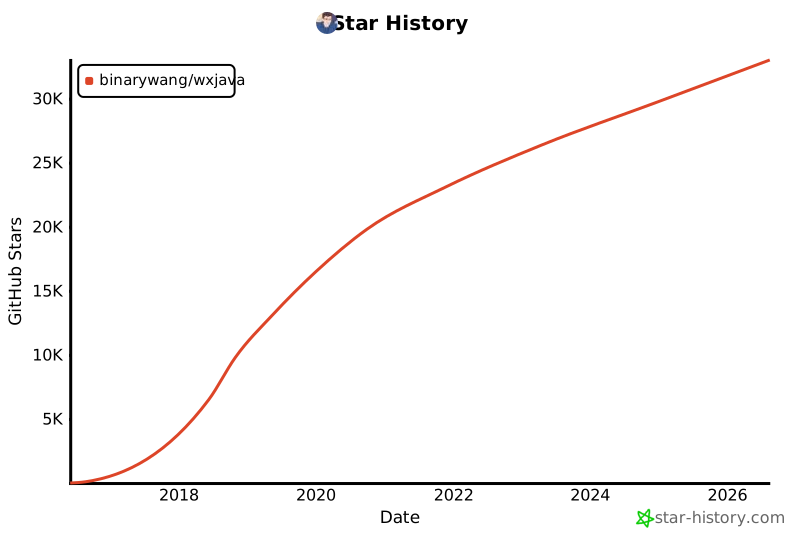](https://star-history.com/#binarywang/WxJava&Date)
|